
Recently, when developing podsowhat.com, the home of the new podcast So What?, one of the hosts of the show let me know the site looked off in dark mode.
I was immediately curious; I didn’t have a dark mode/light mode toggle set up on the site. Setting his browser or operating system preferences to dark mode couldn’t change the site’s styles automatically, could it?
Turns out it could! He had Chrome’s experimental “Auto Dark Mode for Web Contents” flag turned on under chrome://flags/.
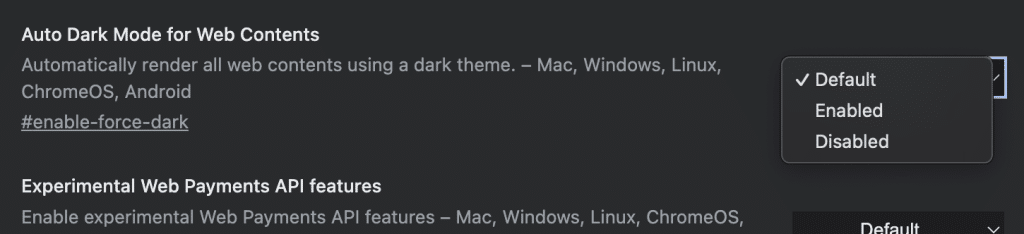
This setting changes a web site’s styles to force a dark mode style, and end results may vary. (He pointed out that if I figured out how to fix this, I should let Lowe’s know, since their site also didn’t look great with this setting enabled.)
I decided it was time to add a dark mode/light mode toggle, and also address this browser edge case. The fix was mainly in CSS. I used the the media query prefers-color-scheme: dark, like this:
@media all and (prefers-color-scheme: dark) {
  /* Dark Mode Styles Go Here */
}
This targets anyone who has the Chrome browser flag enabled, and anyone who has their browser or OS set to dark mode, allowing you to set dark mode styles for anyone who prefers dark mode.
I also added a simple toggle UI element at the top right of the page with a moon icon (to click to trigger dark mode) and a sun icon (to click to trigger light mode):
<a id="ui-theme-toggle" class="ui-theme-toggle ui-theme-toggle-light-mode-active" href="#">
  <img class="ui-theme-toggle-img ui-theme-toggle-img-dark-mode" src="/img/icon_moon.png" />
</a>
Finally, there is some JS that makes it all come together. The key line uses window.matchMedia("(prefers-color-scheme: dark)"), to check if the user has an OS setting, or browser setting or flag to choose dark mode, like this:
const prefersDarkScheme = window.matchMedia("(prefers-color-scheme: dark)");
...
if (prefersDarkScheme.matches) {
  // User prefers dark mode
}
The JS uses class names on the <body> element to indicate whether the site is set to dark mode or light mode. If the user has a preference set for dark mode, the site will load in dark mode, with the option to toggle to light mode. If not, the site is initially set to light mode, and has the option to toggle to dark mode.
